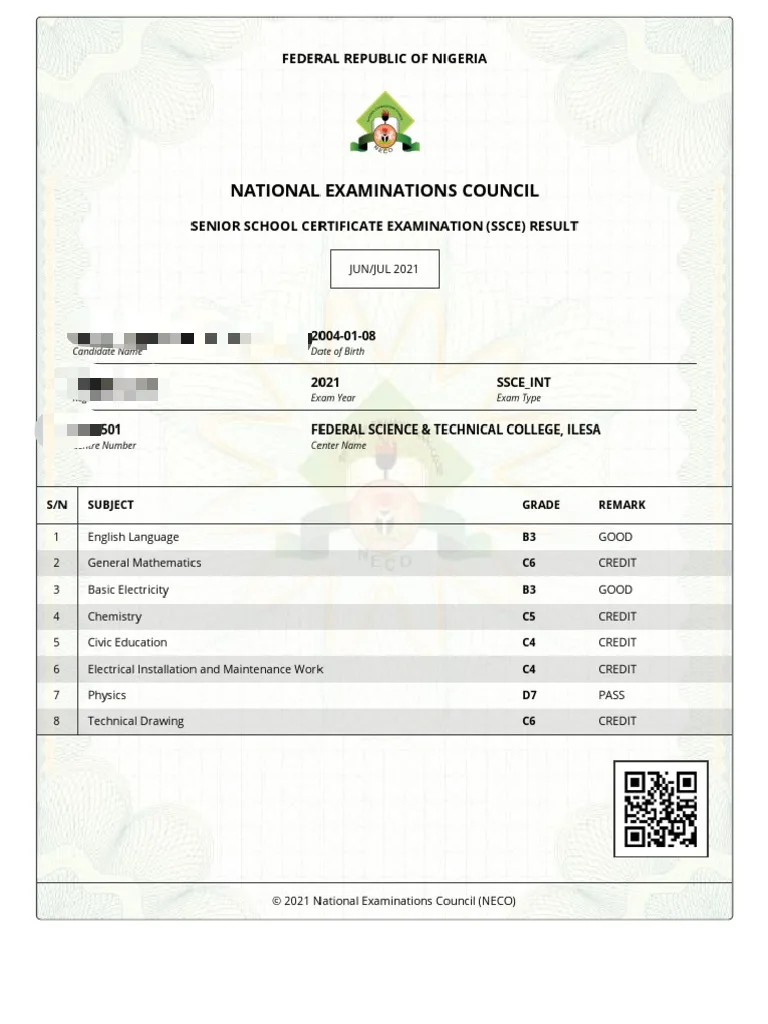
NECO Digital Result Checking Portal 2026: Full Access Guide and Features
For millions of Nigerian students who took the National Examinations Council exams in 2026, there’s one moment that stands out above the rest, the instant the NECO digital result checking portal goes live, and their scores are finally available online. That single webpage symbolizes months of hard work, endless hours of studying, and serves as the gateway to the next chapter in their academic journey.
However, despite its significance, the NECO result portal often trips up thousands of candidates every exam cycle. Issues like broken links, invalid token errors, incorrect exam selections, and site overloads are just a few of the headaches that unprepared users face. This guide aims to change that. Whether you are a first time NECO candidate in 2026 or you are helping a younger sibling through the process.
What Is the NECO Digital Result Checking Portal?
The NECO digital result checking portal is the official, government-operated online platform through which the National Examinations Council publishes and delivers examination results to candidates. Hosted under NECO’s official web infrastructure, the portal serves as the single authoritative source for result data, replacing the cumbersome paper-based notification systems that preceded it.
First introduced to modernise Nigeria examination administration, the portal has undergone significant upgrades over the years and in 2026 offers a cleaner interface, faster load times, mobile compatibility, and an integrated e-PIN purchase system. Candidates no longer need to queue at bank branches just to obtain a scratch card, the entire process, from token purchase to result viewing, can now be completed on a smartphone without leaving home.
The portal’s primary address is result.neco.gov.ng, and this URL remains the only official access point. Any website, application, or link that claims to offer NECO results through a different domain should be approached with extreme caution, as clone sites and phishing pages are common during result season.
Key Features of the NECO Portal in 2026
NECO has continued to improve its digital infrastructure, and the 2026 portal comes with several features that make the result-checking experience smoother than in previous years:
1. Integrated e-PIN Purchase System
Candidates can now purchase their result checker tokens directly on the portal without needing to visit a bank. The payment gateway accepts debit cards, bank transfers, and USSD codes from all major Nigerian banks. Upon successful payment, the e-PIN is instantly delivered to the candidate’s registered phone number and email address.
2. Multi-Examination Support
The portal handles results for all NECO conducted examinations under one unified interface. Candidates sitting for the SSCE Internal, GCE External, NCEE, or BECE can all access their respective results from the same portal by selecting the appropriate examination type from the dropdown menu.
3. Mobile-Responsive Design
The 2026 portal is fully optimisd for smartphones and tablets. Candidates can check their results on any Android or iOS device using a standard mobile browser without needing to download any application. The layout adjusts automatically to fit smaller screens, making it easy to read subject grades and result summaries on a phone.
4. Downloadable and Printable Result Slips
Once a result is loaded, candidates can generate a printable result slip directly from the portal. This slip serves as a useful document for school submissions, admission screenings, and personal record-keeping, though it is important to note that a portal printout is not the same as an official NECO certificate.
5. Real-Time Result Status Display
Beyond displaying actual scores, the portal now clearly communicates the status of every result, whether it is fully released, withheld, pending ratification, or under review. This transparency helps candidates understand where their result stands without needing to make enquiries at NECO offices.
NECO Examination Types Covered by the Portal in 2026
Before accessing the portal, it is essential to know which examination category applies to you. Selecting the wrong examination type is one of the most common reasons candidates see a “no result found” error. The portal covers the following in 2026:
🎓Senior School Certificate Examination (SSCE) Internal
This is the examination conducted for candidates enrolled in approved Nigerian secondary schools, typically held between May and July each year. Results for the 2026 sitting are expected to be published on the portal between August and September 2026.
🎓Senior School Certificate Examination (SSCE) External GCE
Commonly referred to as the GCE, this examination is designed for private candidates, school leavers, and individuals who wish to improve their grades or sit additional subjects. It is usually held between October and December, with results released approximately six weeks after the final paper.
🎓National Common Entrance Examination (NCEE)
This examination determines placement into Federal Government Colleges (Unity Schools) across Nigeria. Results are typically released within four to six weeks of the examination date and are accessible via the same portal.
🎓Basic Education Certificate Examination (BECE)
Conducted for students in Junior Secondary School 3 (JSS 3), this examination marks the completion of basic education. Its results are also available through the NECO portal using the same access process.
What You Must Have Before Visiting the Portal
Attempting to check your result without the right information at hand is a recipe for frustration. Gather the following before you open the portal:
1. Your NECO Examination Number
This unique identifier was assigned to you at the point of registration. It appears on your examination slip, your timetable printout, and any registration confirmation documents. It is typically a numeric string between eight and ten digits. If you cannot locate yours, contact your school’s examination officer immediately because without it, you cannot proceed.
2. Your Examination Year and Type
Know the exact year you sat and the category of examination (SSCE Internal, GCE, NCEE, or BECE). These two pieces of information are required to filter the correct result from NECO’s database.
3. A Valid Result Checker Token
Every result check requires a paid e-PIN, which is unique, single-use, and non-transferable. The cost in 2026 ranges from ₦500 to ₦1,000 depending on the examination type and your chosen purchase channel. Purchase your token from the NECO portal directly or from an accredited bank, never from social media vendors or street hawkers.
4. A Reliable Device and Internet Connection
Use a smartphone, tablet, laptop, or desktop computer with an updated browser and a stable internet connection.
Complete Step-by-Step Guide: How to Check Your NECO Result in 2026
Step 1: Open the Official NECO Result Portal
Type https://result.neco.gov.ng directly into your browser’s address bar.
Step 2: Choose Your Examination Type
On the portal landing page, locate the examination type selector. Use the dropdown menu to choose the appropriate category, for example, “SSCE Internal 2026.” Take your time with this step; selecting the wrong category is a common source of errors.
Step 3: Input Your Examination Number
Carefully type your examination number into the designated field. Avoid copying and pasting if possible, as hidden formatting characters can sometimes cause entry errors. Check each digit against your original registration document before moving on.
Step 4: Enter Your Token PIN
If you purchased a physical scratch card, use a coin to gently scratch the silver panel and reveal the PIN. Be careful not to scratch too hard because an illegible PIN cannot be recovered. If you purchased an e-PIN online, copy it exactly from your email or SMS notification.
Type the PIN into the token field on the portal.
Step 5: Complete the Security Check
The portal may display a CAPTCHA or human verification step. Complete this promptly and accurately. Leaving the CAPTCHA unanswered for too long may cause the session to expire.
Step 6: Submit and View Your Result
Click the “Check Result” or “Submit” button. On a stable connection, your result should load within five to fifteen seconds. The page will display your full name, examination number, and a subject-by-subject grade breakdown.
Step 7: Save Your Result Immediately
This is a critical step that many candidates overlook. Your token is now permanently deactivated so you will not be able to access this result again without purchasing a new token. Do the following immediately:
– Take a screenshot on your device
– Print the result page using your browser’s print function (Ctrl + P on Windows, Cmd + P on Mac)
– Download the printable result slip if the option is available on the portal
– Store the saved copy in a secure folder on your device and back it up to cloud storage
How to Buy a NECO Result Token Directly on the Portal
In 2026, the most convenient way to purchase a result checker token is through the portal itself.
You can check our article on NECO Result Token Purchase Guide 2026: How to Buy and Use NECO Result Checker Token
Result Status Messages: What Each One Means
The portal does not just display grades but it also communicates your result’s processing status. Here is what each status message means:
Result Released: Your result has been fully processed and approved. Everything is in order.
Result Withheld: Your result has been placed on hold. This is most commonly due to an ongoing examination malpractice investigation. If you believe this is an error, contact NECO formally with your examination documents.
Awaiting Ratification: Your result has been processed but is pending final board approval. This status usually resolves within a few days of the initial release.
Result Pending: Processing is not yet complete. Check back after 24 to 48 hours.
Result Not Found: No record matching your details was found. This could indicate a wrong examination number, wrong year, wrong examination type, or a registration issue that needs to be addressed at a NECO office.
Troubleshooting the Most Common NECO Portal Problems in 2026
Portal Is Slow or Unresponsive
Cause by High traffic during the first 48–72 hours after result release.
Fix: Check during off-peak hours like early morning (before 7 AM) or late night (after 10 PM) tends to have significantly less traffic. Also clear your browser’s cache and cookies before retrying.
Invalid PIN Error After Entering Token
Caused by Mistyped PIN, already-used token, or a token that does not match the selected examination type.
Fix: Re-enter the PIN very carefully. If the token is confirmed unused and the error persists, contact your purchase vendor or NECO’s support desk with proof of purchase.
NECO Examination Number Not Found
Caused by Incorrect examination number entered, or wrong examination year/type selected.
Fix: Cross-reference your examination number with your original registration slip. Ensure you are selecting the correct year and examination category before submitting.
Page Freezes After Clicking Submit
Caused by Browser compatibility issue or unstable network.
Fix: Switch to Google Chrome or Mozilla Firefox. Ensure your internet connection is stable. Disable any VPN or proxy service that might interfere with the portal.
Result Showing Wrong Personal Details
Usually caused by Data entry error during registration, or a name mismatch in NECO’s database.
Fix: Do not use the result for any official purpose until the discrepancy is corrected. Visit a NECO state office with your original registration documents to request a data correction.
Security Warnings: Protect Yourself on the NECO Portal
The period around NECO result release is prime season for online scams targeting students and parents. Stay safe by following these precautions:
- Only use the official URL
- Never pay for tokens via WhatsApp or social media, only use only the portal or accredited banks
- Do not share your token PIN with anyone before checking your result
- Ignore messages claiming your result has been “upgraded” or “corrected” for a fee, this is a widespread scam
- Report suspicious portals to NECO via their official contact channels and to the Nigeria Police Force Cybercrime Unit
Frequently Asked Questions About the NECO Portal 2026
Below are few frequently asked questions which we have answered with the most correct answers
Can I check my NECO result for free on the portal?
No. Every result check requires a paid token. There is no free access option on the official portal.
Is there an official NECO app for checking results?
No. There is currently no official NECO result-checking app on the Google Play Store or Apple App Store. Use only the browser-based portal.
Can I check my result on a 2G or slow internet connection?
It is possible but not recommended. A slow connection can cause the session to time out before your result loads, wasting your token. Use at least a 3G or Wi-Fi connection.
What happens if my token is deactivated before my result loads due to a page crash?
Contact NECO’s support immediately with your transaction receipt and details. NECO can investigate and issue a replacement in confirmed technical failure cases.
Can parents check their child’s result on their behalf?
Yes, as long as they have the examination number and a valid token. There is no restriction on who physically performs the check.
How many times can I view my result on the portal?
Only once per token. After the first successful display, the token is deactivated. To view the result again, you must either use the saved copy or purchase a new token.
Conclusion
The NECO digital result checking portal in 2026 is fast, accessible, and more user friendly than ever before. Armed with your examination number, a valid token, and the step-by-step knowledge in this guide, checking your result should be a smooth, stress-free experience.
Prepare early, purchase your token from a trusted source, use the official URL every single time, and save your result the moment it appears on your screen.
Best of luck to every 2026 NECO candidate awaiting their results.